
 EN
ENAutodesk InfraWorks: Infrastructure Planning and Design in Real-World Contexts
Autodesk InfraWorks is a powerful 3D modeling and conceptual design tool that helps engineers and planners create infrastructure projects in real-world geographic contexts. By integrating GIS data, topography, and satellite imagery, InfraWorks delivers accurate models for roads, bridges, and drainage systems from the earliest stages. Its simulation capabilities—such as flood analysis, traffic studies, and visual impact assessments—enhance decision-making and reduce risks. With cloud collaboration and interactive visualizations, InfraWorks improves communication with clients and stakeholders while accelerating project workflows. Seamlessly integrated with Civil 3D, Revit, and Navisworks, it enables connected BIM processes that ensure efficiency, sustainability, and cost control in modern infrastructure development.
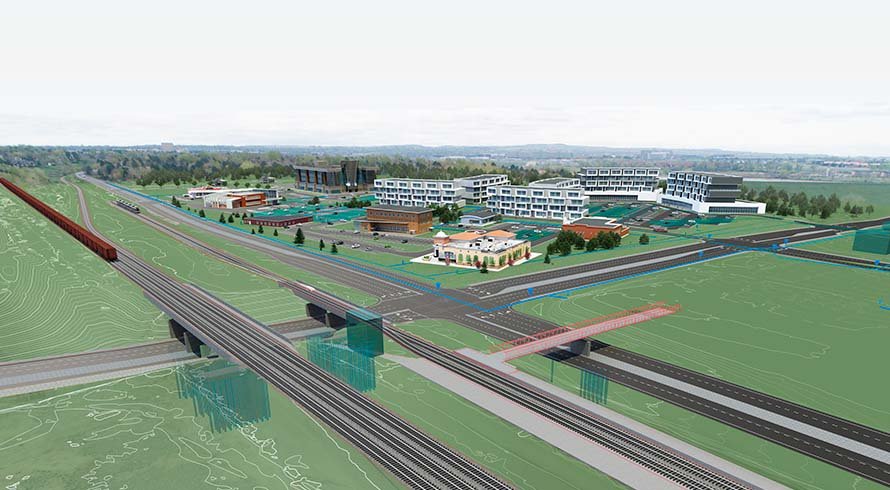
In the world of civil engineering, technology is key to executing infrastructure projects efficiently, sustainably, and accurately. Autodesk InfraWorks has become a powerful tool for conceptual design and project visualization in real geographic contexts, enhancing decision-making from the earliest stages.
What is Autodesk InfraWorks?
InfraWorks is a conceptual 3D modeling software that enables the creation of realistic representations of roads, bridges, drainage systems, and other infrastructure. It integrates GIS data, topography, satellite imagery, and CAD/BIM files. Its focus is on preliminary planning, making multidisciplinary collaboration and clear communication with stakeholders easier.
Key Features of Autodesk InfraWorks
- Geospatial Data Integration
Import and combine GIS models, satellite images, topographic data, and CAD files to generate an accurate contextual 3D model. Thanks to Model Builder, topographic models can be created automatically without prior surveys—ideal for conceptual design. - Dynamic Infrastructure Modeling
Users can design roads, channels, bridges, and more with intuitive tools, applying parametric rules to adapt designs to technical standards. - Simulation and Analysis
InfraWorks allows for simulations such as:
• Visual impact studies
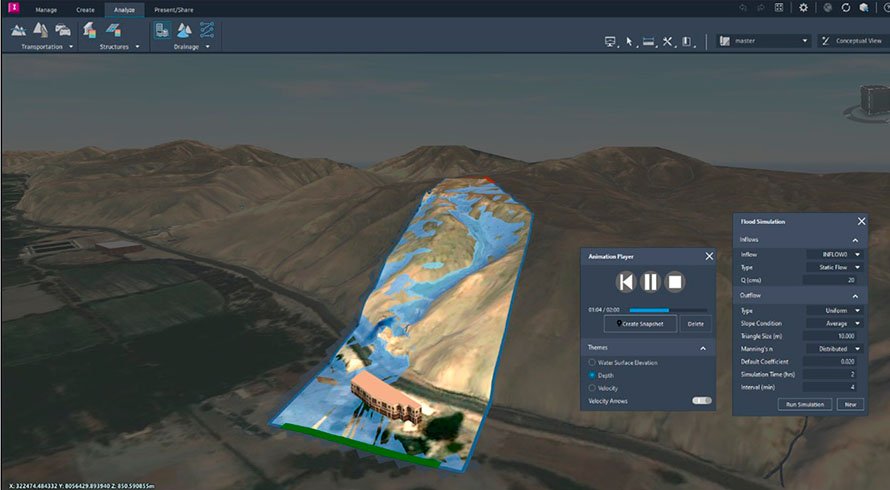
• Drainage and flood simulations (with the RiverFlow2D plugin)
• Traffic and transportation analysis With the RiverFlow2D plugin by Hidronia LLC, flood events can be analyzed using real hydrological data, adjusting variables such as flow rate, Manning’s coefficient, or event duration, and visualizing: • Water elevation
• Depth
• Flow velocity - Cloud Collaboration
Models are stored in the cloud, enabling collaborative, synchronized work among teams from any location. - Project Visualization and Presentation
InfraWorks makes it easy to create interactive, real-time presentations, ideal for communicating ideas clearly and visually to clients or authorities.
Key Benefits of Autodesk InfraWorks
- Realistic Geographic Context: Improves project site understanding from the conceptual stage.
- Efficient Design: Enables rapid iteration and comparison of multiple alternatives.
- Better Communication: Visualizations are accessible even to non-technical stakeholders.
- Cost Reduction: Helps identify errors or conflicts early on.
- Seamless Integration with Civil 3D, Revit, and Navisworks: Perfect for integrated BIM workflows.
Conclusion
Autodesk InfraWorks is an essential tool for planning and conceptual design of infrastructure projects. Its ability to combine 3D modeling, geospatial data analysis, and technical simulations in a single platform makes it a comprehensive solution for engineers, urban planners, and designers.
👉 If you want to implement InfraWorks in your infrastructure projects or need guidance on its use, contact us. At PCG, we help transform your ideas into real-world solutions with innovative technology tools.